
 Role Requirements
Procedure Scope: Administrators
Required Group Membership: Admin.Security

Handbook Reference
Package: Device Security
Domain: N/A
Modifies: N/A

Creating TAP for User Device Onboarding
- Navigate to the Users – Entra ID portal, locate the target user by scrolling the list manually, or for larger directories use the search bar to narrow results quickly. Select the user account to open their profile.
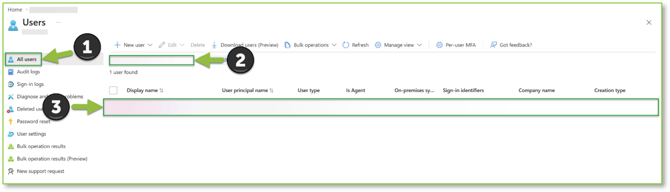
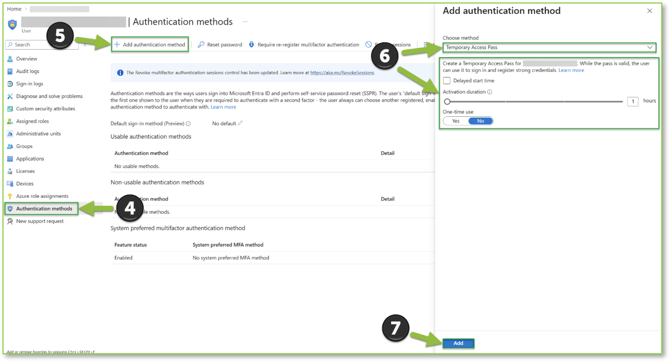
- Open the Authentication methods tab, then select the + Add authentication method action. In the pop-out, choose Temporary Access Pass from the Choose method dropdown.
Configure the following:
- Delayed start time – Optional; specify if you want the TAP to activate later.
- Activation duration – Keep to 1–2 hours for standard OOBE workflows.
- One-time use – Set to No. TAP can be consumed up to 3 times during OOBE, so multi-use avoids regenerating the credential at each prompt (unless single-use is specifically desired).
- Select Add to finalize TAP creation.
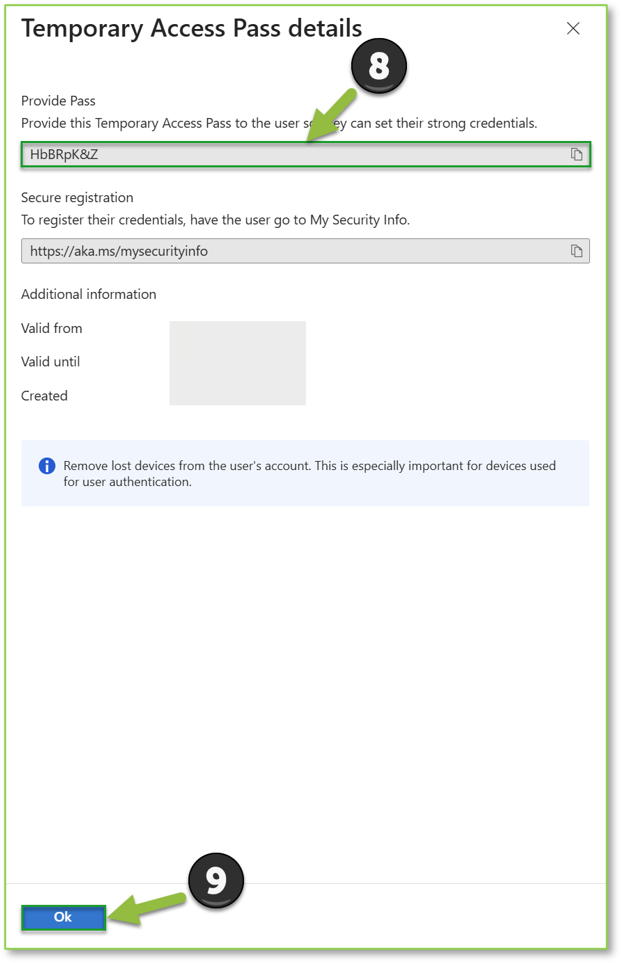
- Confirm the Temporary Access Pass details panel appears, then capture the Provide Pass value. This is the credential you'll distribute to the end user for OOBE onboarding. The Secure registration link can be disregarded; access to My Sign-ins, My Account, etc. sits behind Device Compliance requirements that can't be met until the device is onboarded into Intune. Authentication methods (Authenticator App, etc.) are handled post-onboarding. Once the TAP credential is captured and distributed, select Ok to finalize the TAP creation process.
Need Assistance?
Reach out to your Customer Success Manager to discuss how a Sittadel cybersecurity analyst can assist in managing these tasks for you. New to our services? Inquire about arranging a consultation to explore optimizing your Azure environment for painless management.