![Sittadel_Logo_Stacked_2023_final_NoText.png]](https://knowledge.sittadel.com/hs-fs/hubfs/Sittadel_Logo_Stacked_2023_final_NoText.png?height=44&name=Sittadel_Logo_Stacked_2023_final_NoText.png)

Role Requirements
Procedure Scope: Administrators
Required Group Membership: Admin.Security

Handbook Reference
Package: Identity Security
Domain: Country Login Management
Modifies: Allowed Login Countries

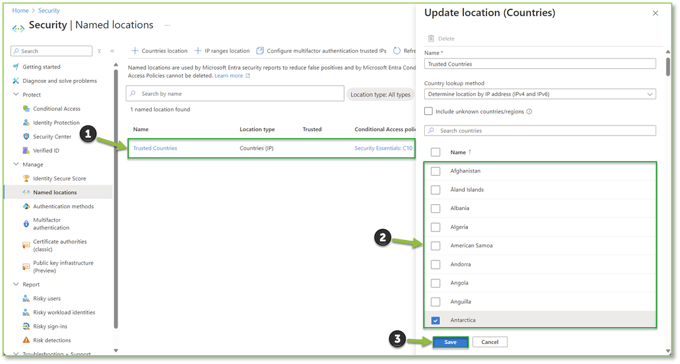
- Navigate to the Named Locations – Azure Active Directory portal, locate and select the Security Essentials Trusted Countries entry or an Equivalent Existing Trusted Location entry. A flyout will be displayed showing a list of all designated Countries or Regions that have been delegated geofenced trust to access Microsoft tied resources, you can make any necessary additions by selecting the checkbox next to a desired Country or Region followed by selecting Save to finalize the addition.
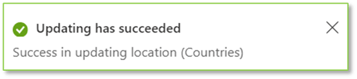
- Upon successful finalization a notification will be displayed showing that the added entries have been successfully uploaded.
Need Assistance?
Reach out to your Customer Success Manager to discuss how a Sittadel cybersecurity analyst can assist in managing these tasks for you. New to our services? Inquire about arranging a consultation to explore optimizing your Azure environment for painless management.